
Announcing: Colorist Flight School LIVE! 2013

Introducing Our New 3-Day Workshops

Colorist-Flight-School-Wings-800pxI am very pleased to announce that Tao of Color is now offering live training workshops in seven cities around the United States in the Summer / Fall of 2013.

About the Workshop
This idea of offering live workshops—which are an extension of my online training–has been on my agenda for a long time but i was missing one vital component… a short film to base the training around. Why a short film?

Workshopping a Color Grading Session
I needed a short film so I could workshop / mimic a color grading job. From launching the software through final delivery it allows me to teach the software interface on a single cohesive project–rather than a random collection of clips. And all during the process we can talk craft and client relations. It also allows us to do one of the most difficult things there is… grading to someone else’s vision. It allows for a marriage of theory + craft + software.

BloodyCuts.co.uk and Colorist Flight School LIVE!
Anyone who has followed the Tao of Color knows that we’ve developed a very close relationship with the horror film anthology site, BloodyCuts.co.uk. I grade their extremely popular short films and they license back to me those films in any training that I develop here on the Tao… plus they get a percentage of each transaction, which helps fund their next short film… Win, win and win.

And upon grading the 8th short film in their series, Death Scenes, this past winter – I knew I had finally found the film I needed for my Live workshops. What makes Death Scenes so good for this 3-day workshop?

Patrick teaching at his very first workshop in  Georgia

Patrick teaching at his very first workshop in Georgia

Elements of a great ‘training’ film
Death Scenes is most easily categorized as a supernatural thriller that has all the components I needed to base a workshop around:

  • It’s just long enough: At under 5 minutes, it’s meaty enough to sustain three days of instruction and hands-on training (it took me about 12 hours to grade that film the first time around, including revisions) without being ovewhelming.
  • It’s fun: The antagonist in the film has a GREAT look and the twist surprise at the end was extremely well executed with top-notch monster prosthetics.
  • It cleans up nicely: The film was shot ‘flat-style’ on a Sony F-3. You can really see the results of your work while having many shot-matching challenges associated with an aggressive shooting schedule. Plus, since it was shot directly to ProRes422HQ, the footage is high-quality but not pristine—reflecting the reality that most of us have to deal with on a daily basis.
  • It can be made PG: The blood in this film is largely incidental to the story. I was able to edit out all the objectionable material without losing the story (scroll down to watch the cut-down of the film we’ll be grading in the workshop… and yes, I provide the uncut version of the film if you want to practice with that version at home).
  • Creating Looks is part of the director’s vision: The director needs us to come up with three different Looks for this film – one for the main storyline and two other distinct looks for two different flashbacks from two unique perspectives.
  • Students can take the film home: As with my online training, students are licensed to take this film home with them, continue working on it and integrate their grades into demo reels or use in private client demos. This requirement is really REALLY important to me. Whenever I take live training I’m always annoyed that I can’t take the footage home with me to work with and continue practicing… especially since it’s so hard to find good challenging coherent material to practice upon. All the training at the Tao features this unique benefit and this workshop is no exception.

A 3-Day Workshop That Spans Weeks!

Having a great film isn’t enough… I wanted to create a workshop with ‘legs’. One that starts several weeks before the workshop – and continues long after the workshop ends. I don’t just want to present a ’3 Days and Out’ event.

To achieve that, here’s what you’ll experience at the Colorist Flight School LIVE! workshop:

  • Two weeks before the Workshop: You’ll gain access to a special sub-site here on the Tao of Color and 14 days before the workshop begins you get access to my one-hour Webinar, “Why Color Grading Is So Hard (and what you can do about it)”. This presentation ensure that the day we start the workshop, everyone in the room has the same fundamental foundation about color grading, room setup, the color grading process and how to read scopes. Even very experienced pros find this presentation filled with interesting facts and I consider it a foundational video for EVERYTHING I do here at the Tao. If you buy ANY of my training here at the Tao you get a similar video… and the Live Workshop is no different.
  • Students brought their own gear to the Atlanta BYOL workshop

    Students brought their own gear to the Atlanta BYOL workshop

    One week before the Workshop: I release my audio recording of my first conversation with the Director and Editor of Death Scenes as we discuss their technical and creative goals and challenges. This 45 minute ‘podcast’ sets the foundation for all the creative work we do at the Workshop.

  • During the 3-Day workshop: The moment the workshop begins, everyone has watched and listened to all the introductory material – so we can start working almost immediately. When you walk in the room, you’re given a USB Tao of Color branded hard drive that’s yours to keep. It contains everything you need during the workshop: XMLs, EDLs, camera-original footage and more. It total there’s just under 90 gigs of material. When the workshop ends you keep everything on that hard drive and export your Resolve database from the previous 3 days worth of work you did so you can continue working on it at home.
  • After the Workshop: Just after the workshop ends, you’ll be given access to the current online version of Colorist Flight School, where you can grade a second, entirely different short film, Dead Man’s Lake. All the video lessons and camera original footage is already on the USB hard drive you received at the workshop – so you can get started grading this second project immediately. You’re given all 6 hours of my DaVinci Resolve fundamentals video training series, so you can revisit core concepts from the workshop. And if that isn’t enough, you get 2 months free access to MixingLight.com – the brand new color grading website launch at NAB 2013 with its continuously growing library of quick color grading insights.

What you’ll be learning . . .

While designing the curriculum for the workshop, here’s what I set out as my goals for each student to take-away from this 3-day workshop:

  • Learn to use DaVinci Resolve in context of an actual real-world job
  • Work from importing through final render
  • Learn how to evaluate a shot, use that evaluation to create a plan of attack and execute the plan of attack… all while keeping in mind the creative intent of the Director
  • Solve real-world problems while learning to grade for shot continuity, context and emotion
  • Systematically explore DaVinci Resolve, digging deeper into it’s toolset while learning each step of The Tao Colorist 3-Step Technique
  • Learn advanced keyframing and tracking techniques
  • Work with RAW and LOG camera formats and adapt The Tao Colorist 3-Step Technique for these specific workflows
  • Extensive Q & A opportunities, working through color grading questions you have – at the exact moment you have them.
  • Receive special bonuses that will continue your education for several more months (see the section above)

At the end of this blog post is the full syllabus – which WILL get revised on a class-by-class basis to meet each class’ unique needs and interests.

Who is this Workshop for?

Quite simply: Current or aspiring video professionals. Whether you’ve never touched DaVinci Resolve before or you’re an experienced Resolve colorist – you’ll be challenged, never left behind, never bored. The workshop is appropriate for anyone looking to expand their skill set and make color correction either a primary or secondary offering to their clients.

The only pre-requisite: You need a basic knowledge of timelines and other post-production terminology. It would also be helpful if you’ve tried to apply a 3-way color corrector at some point in your career and have (some) experience working is a non-linear editing package (you needn’t be proficient). Other than that, you should be good to go.

On each of the city-specific Eventbrite sign-up pages I have several of quotes from the attendees of my very first workshop in Atlanta. Here are just two that really summed up my greatest hopes for this Workshop:

“I had never used DaVinci Resolve before and I was little hesitant about [the workshop] because I didn’t feel that my color grading skill were quite up to par as they should be. Patrick did an AWESOME job explaining the use of the software and didn’t make me feel any less about being a beginner with the use of the program. It was a lot to digest in 3 days but I feel more confident moving forward and I’m looking forward to my growth of skill level in using the program and color grading. I would highly recommend to anyone to to take this course if they are able. TAO OF COLOR ROCKS!” – Greg Dinkins / Macon, Ga.

Instructor feedback is a big component of this workshop

Instructor feedback is a big component of this workshop

Quick note: Greg emailed me a few days after taking the workshop… he had trouble getting Resolve to read the camera original P2 footage on a client project (it turns out: Resolve doesn’t read the native P2 folder structure). By the time I had gotten back to him he had already moved on to the ‘flat file’ workflow and cut up a self-contained export and was grading in Resolve.

I can’t tell you how elated I felt, knowing that seven days prior he hadn’t even opened DaVinci Resolve but now could adapt his workflow as needed!

“Well, I have been using Resolve for about a year and a half. I thought [the Workshop] was going to be too basic for me. And that it won’t be worth the money, because it was going to go through stuff I already knew . . . I was completely wrong. It has gone though so many of the finer points and so many things I was doing one way there are better way to do things.  And answered a lot of my basic questions. And have gone into finer details of things I thought I was doing right, but found out there I wasn’t doing it the most appropriate way.” – Rob Leaderman / Atlanta, Ga.

How cool is that? Feedback from two professionals at different points of the learning curve with color correction and DaVinci Resolve. Yet neither felt they were lost, left behind or bored.

7 Cities in 4 Months

When deciding where to host these Workshops, the easy choice would have been to host them in New York City and L.A. But I decided to try an experiment and hold them in smaller markets around the country. I want to see if cities like Austin, Atlanta, Orlando, Boston and others could support a premium 3-day workshop… where student travel expenses could be minimized – instead of just keeping to the big bi-coastal markets.

We’ll see what happens – but thanks to the sponsors of this 7-city tour, it doesn’t matter if only 1 person signs up for a city… if you sign up, I’ll be teaching. It’s that simple.

My minimum enrollment is: One

Here are the 8 cities of this Tour (in order of dates). And other than the Austin event, they’re all being hosted by Future Media Concepts:

What cities and dates is this workshop being offered?

Click on a city to be taken directly to the sign-up page, or use the calendar on the right

  • Atlanta, GA: May 30 – June 1 (completed)

The Sponsors That Make This Workshop Happen

If it weren’t for these following sponsors, I couldn’t roll out this training the way I am. Thanks to their financial support, I can guarantee every single workshop will be held, even if only one person signs up! Who knows, if you sign up and end up with one-on-one training… you could easily be the most well-trained colorist in your market! And if 10 of you show up… you’ll have the basis for a local color grading User Group!

Gold Sponsor

FSI is a direct-to-end user manufacturer of high-quality, feature-rich, price-competitive LCD critical viewing reference panels for professional video applications.

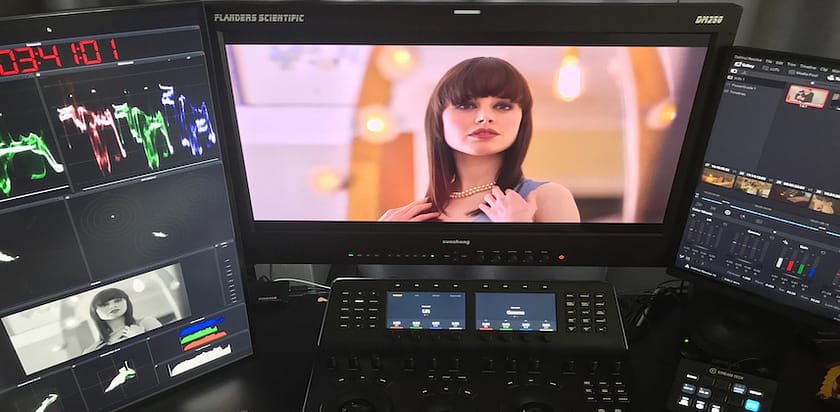
They will be shipping one of their 10bit reference LCDs to each workshop so all attendees can optionially spend some time grading to a 10-bit reference monitor.

FSI is also providing a 10% discount to all workshop attendees that can be applied to ANY of their gear (a potential $550 savings).

Supporting Sponsors

Yes, the co-creators of the original Kona card, the creators of the Decklink series of output boards (plus a bevy of other conversion and monitoring gear) and the company that bought DaVinci and released the amazingly free version of DaVinci Resolve are on-board as Supporting Sponsors of the 2013 Tour of Colorist Flight School LIVE!

BlackMagic is also providing an UltraStudio Mini for this Workshop to demonstrate how we can get from a Thunderbolt-enabled computer out to the FSI 10-bit LCD display.

Thanks to Blackmagic, at the end of every workshop we will be raffling off:

  • The full version of DaVinci Resolve ($999 value)

If the winner already has the full version of Resolve they can optionally choose one of these boxes that allow for monitoring out of any Thunderbolt laptop, iMac or tower:

  • UltraStudio Express
  • UltraStudio Mini

Event Host

fmcLogo

Another instrumental partner is this series of 7 workshops is Future Media Concepts. It’s as much an experiment for them as this is for me. And they made it much easier for me to coordinate this multi-city tour. Thanks to their agreement to open up their facilities across the USA to this workshop… I can focus on creating a great workshop, knowing I’ll have quality learning labs and projectors.

Final Thoughts

In a few days I’ll post pictures and thoughts about my very first time presenting Colorist Flight School LIVE! in Georgia. We had a great time and Walter Biscardi and his staff at Biscardi Creative were amazing hosts.

In the meantime, feel free to head over to Eventbrite to reserve your spot in your city of choice! I’ve set a limit of 10 students per workshop, so if you want to attend don’t dawdle… go ahead and sign up.

As promised, here’s…

The 3-Day Agenda

Note: The curricula below comprise activities typically covered in a class at this skill level. The instructor may, at his/her discretion, adjust the lesson plan to meet the needs of the class.

Day 1

  • Introductory remarks & review of materials provided to students in the two weeks prior to start of the workshop
  • Overview of the course material provided on the hard drive
  • Introduce each other
  • Prepping DaVinci Resolve for a new project (includes setting up databases and core system / project preferences)
  • Tour of DaVinci Resolve
  • How to find and load footage
  • Scene Cut Detection
  • Importing a timeline via XML / EDL / AAF
  • Checking imported timelines against a reference movie
  • Essentials of: Color Balancing, neutralizing color casts, setting contrast and saturation, using the Waveform / RGB Parade / Vectorscope monitors
  • “The Grayscale Game – Contrast”
  • Doing primary adjustments using: Color wheels, Curves, Log tools
  • Exercise: Execute the Primary Grades for a section of the short film
  • Exercise: Intro to Shot Matching
  • Using the Gallery & Still Store

 Day 2

  • XML Recap
  • “The Grayscale Game – Color”
  • The value of ‘pre-rendering’
  • Instructor review of Primary Grades from end of Day 1
  • Serial Nodes In Depth
  • Qualifications
  • Add Outside Node
  • The Three Step Color Grading Process… applied to nodes.
  • What is shot matching and how do you do it?
  • Exercise: Match shots across the previously graded section of the short film
  • Instructor review
  • Power windows
  • Inside / Outside Nodes
  • Basic Tracking techniques
  • Exercise: Add vignettes and face masks
  • Keyframing
  • Pulling HSL keys
  • The ‘Hue vs.’ curves
  • Exercise: Start creating Looks
  • How understanding the ‘Singularity Effect’ will help you in creating convincing Looks
  • Continuing with Looks
  • Tracking and ‘Interactive Mode’

Day 3

  • XML Recap
  • Tracking Recap
  • ‘The Grayscale Game – Color & Contrast’
  • Create accounts to access the Colorist Flight School ‘Dead Man’s Lake’ training
  • Continuing with Looks
  • Parallel and Layer Mixer Nodes: What’s the difference?
  • Composite Modes
  • Create 2nd Look: Student Choice
  • Exercise: Controlling your image using ‘image segmentation’
  • Creating ‘Approval Renders’ for client review
  • Creating final renders for ‘flat file’ and ‘roundtrip’ workflows
  • Working with RAW camera formats (RED, BlackMagic Cinema Camera)
  • Introduction to ‘Dead Man’s Lake’ and working with ‘flat’, Log-encoded footage… with and without LUTs
  • Export your DaVinci Resolve Colorist Flight School project files – so you can take the work home with you and continue your studies.
  • Class Photo


Comments { 2 }

Tao of Color Announces a New Website: MixingLight.com

Click to visit MixingLight.com and get on the Launch List!

Can you imagine…

…A website that covers a broad swath of the craft of color correction? Plug-ins for NLEs. Pre-production tips for DPs and Directors. Workflow suggestions for small productions staffed by do-it-all creatives. Analysis of the latest graphics cards.

Have you searched YouTube, Vimeo, blogs and podcasts for those kinds of tips, finding a few gems in a mass of sub-standard advice and even worse audio or picture quality?

Luckily over the past few years, through blog posts and User Group presentations, Twitter and training websites – and yes, a really awesome Weekly Newsletter – the pain of finding quality timely information is slowly being alleviated as more pros share their ideas and experience. But we’ve got much further to travel.

Today, the Tao of Color is proud to announce the next step in that progression:

The launch of a companion website: MixingLight.com!

MixingLight.com: 50 miles wide, 10 Feet down… Monthly

MixingLight.com is a stand-alone monthly membership-based website that’s a natural supplement to the TaoOfColor.com. Where the Tao takes a very few subjects and dives into deep detail – Mixing Light will cover a huge array of color grading topics and present them in much more digestible bits.

MixingLight.com will launch in 2Q2013 and is a partnership between colorists Robbie Carman, Patrick Inhofer and Dan Moran.

Mixing Light is geared to the multi-role creative who has become aware of how a solid color grade by a trained professional can massively increase the quality (Production Value) of the final projects they create. Mixing Light will cover the entire craft: Technique. Software and workflow. Hardware and gear. From that which is timeless to that which always seems to be ever-changing.

Mixing Light will present these topics to its members in the form of Articles, Podcasts and Video tutorials – with a protected forum allowing working professionals to have frank discussions away from the prying eyes of our clients. Mixing Light will foster a supportive community that’s always on-the-ready to figure out whatever funky new codec, gear, workflow or software our vendors are throwing our way; plus whatever hot new ‘thing’ our clients think they suddenly need to have.

And how does this differ from what Tao of Color is already doing?

Tao of Color: 50 feet wide, 10 miles down

The TaoOfColor.com is designed to take one aspect of color grading and go in-depth on it. We take one topic, 50 feet across, and dig 10 miles down examining every strata of sediment we come along – carbon-dating it, analyzing it, teaching it… so that you can do the same, replicating our workflow until one day you own it, you modify it, you master it.

For instance, our Grade-Along takes a 7 minute short film… and turns that into 10 hours of sit-next-to-a-colorist-and-ask-questions-as-he-grades training! Like I said, 50 feet across, 10 miles down.

The thing that’s been missing from the Tao is a broader view. A more generalist approach to Color Grading.

That’s where Mixing Light fits in. It’s not a replacement to the Tao. It’s a broadening of the Tao. In a very secret place in my heart, I really hope that Mixing Light is where film and video pros will develop a love for color grading… and then jump to the Tao for some really deep, lose-an-entire-weekend type of training.

At this point you may be wondering, who is crazy enough to attempt this madness – on a monthly basis, no less?

Who Is MixingLight.com?

If you think Mixing Light sounds like a LOT of work. You’re right. It is. Which is why it’s taken me almost 4 years to find the right partners to launch a montly membership site like MixingLight.com. There’s no way a single person could achieve such a lofty goal.

I couldn’t be prouder (frankly, I feel amazingly lucky) to introduce you to the MixingLight.com creative team (listed by alphabetical order, full bios at the end of this blog post):

Robbie Carman

Robbie Carman: Co-founder, MixingLight.com

Robbie Carman: Co-founder, MixingLight.com

Robbie is one of the hardest working colorists I know. Partner in Amigo Media, he runs a finishing shop in Washington DC . From series to political spots to documentaries and indie features, he’s got the chops and the experience to talk authoritatively about the craft. He’s also a gear-head and always kits his room out with the latest gear – and loves talking about what works and what doesn’t. On top of that he’s a prolific author, trainer and speaker. If I get my way, one series that Robbie will do for Mixing Light is ‘The Business of Time Management’. Seriously, I don’t know how he fits it all into a day.


Patrick Inhofer

Patrick Inhofer

Patrick Inhofer: Co-founder, MixingLight.com

That’s me, Founder of this website and owner of my own grading / finishing boutique: Fini.tv. Like Robbie, I have a strong background in online finishing (having transitioned from online editor to colorist). I’ve gone from color grading on tape (using Setup, Gain, Chroma and Hue knobs) to grading in NLEs and finally in dedicated grading apps and delivering to broadcast / cable television and the indie film circuit. I’m not a gear head  (not compared to Robbie) but I’m huge on workflows that require moving projects between multiple software apps. I’m also a control surface junkie.


Dan Moran

Dan Moran: Co-founder, MixingLight.com

Dan Moran: Co-founder, MixingLight.com

If Robbie and I are the Old Hands of this team, then Dan is the Young Gun. He’s an intuitive colorist and creative artist who has taken full advantage of some amazing opportunities and has the pulse of upcoming trends. Where Robbie and I make a living using DaVinci Resolve… Dan made a living working for DaVinci as a worldwide Resolve demo artist and trainer. He now grades spots and films for one of London’s hottest houses. You can bet he’ll be riffing off Resolve tutorials. He’ll also be taking the lead in MixingLight’s podcasting series – with his passion in talking to others about the craft. He’ll also be widening his view on other high-end color grading kits… and taking us all along for the ride.

MixingLight.com: The Roadmap

Mixing Light will be going into private beta around February 2013. In April (right around NAB) we’ll be going live. Yes, we have a ton of work ahead of us to get this thing off the ground. And we couldn’t be more excited about it! Between the three of us we’ll be splitting the monthly tasks of delivering consistently top-notch color correction education and training. We’ll also be tapping each of our own personal networks of successful creatives to contribute to Mixing Light on a monthly basis.

If this sounds interesting to you – head on over to MixingLight.com right now! Sign up for our Launch Newsletter – which will be delivered about twice a month until we launch. It’ll keep you up-to-date on how the launch is going, while also allowing us to deliver tips, tricks, podcasts and videos that will be representative of what we have planned for Mixing Light. And if you sign up for the Newsletter, there’s a good chance you’ll be invited into the Beta cycle – before we go live.

Or, you can sign up right here:

Share the News!


MixingLight.com: Full Bios

Robbie Carman

Robbie Carman is a professional colorist and co-owner of Amigo Media LLC a finishing boutique located in the Washington, DC area with a focus on broadcast television and independent film finishing. Robbie has 15 years of experience grading, including hundreds of programs for many of the Discovery Network channels, National Geographic, PBS, MSNBC and others. He counts technical problem solving and client communication amongst his strengths.

Robbie has co-authored many books including: Final Cut Pro Workflows: The Independent Studio Handbook with Jason Osder, From Still to Motion A Photographers Guide To Creating Video With Your DSLR with Richard Harrington, Jim Ball, and Matt Gottshalk and An Editor’s Guide To Adobe Premiere Pro (1st and 2nd Editions) with Richard Harrington and Jeff Greenberg. See all Robbie’s books on Amazon here: http://amzn.to/TM2BZK

In addition to writing,  Robbie has also contributed as the technical editor to some popular books including – Alexis Van Hurkman’s Apple Pro Training Series: The Encyclopedia of Color Correction for Final Cut Pro, The Apple Pro Training Series: Color by David Gross and Michael Wohl and The Apple Pro Training Series: Final Cut Pro 7 Quick Reference by Brendan Boykin.

Robbie has also authored many courses on Lynda.com focusing on color correction and editing. View Robbie’s Lynda.com training here: http://bit.ly/UGQ3ax

In addition to color grading and writing work, Robbie is also an Adobe and Apple Certified Instructor. He speaks regularly at conferences such as NAB, IBC,  The Editors Retreat, The NY Post Production conference, and GV Expo.

Patrick Inhofer

Patrick Inhofer is a professional colorist / finisher and owner of the New Jersey-based boutique Fini.tv. He’s a 23-year veteran of the New York City post-production community. Patrick takes his experience working at high-end full-service post houses and delivers those same services to low- and mid- budget productions, bringing them high-quality workflows at competitive prices.

Patrick has worked on films, documentaries, television series, corporate videos, promos, and ID packages for a range of clients ranging from broadcast / cable networks, to indie films making the festival circuit, to corporate giants. He’s worked with directors Barry Levinson (more than once) and Bruce Sinofsky. Other clients include: HBO, NBC, ABC, Showtime, ESPN, Oxygen, AMC, Lifetime, TNT, TBS, National Geographic Channel, Starwood Hotels & Resorts, AOL, TV One, Virgin Records, Astralwerks…

Patrick’s first worked on Avid Media Composer as an Assistant Editor on HBO’s ‘The Babysitter’s Club’ in 1991. His first freelance gig in 2001 was to color correct a food documentary using Avid Media Composer’s ‘Levels’ filter (a practice he does not recommend!). He founded his first post-production boutique in 2002 and is currently the Owner / Colorist at Fini.tv, Inc.

He began teaching color correction standing before the New York Final Cut Pro Users Group in 2005 (where he subsequently became its Treasurer and, later, President). In 2010 Patrick founded the software agnostic color grading website TaoOfColorGrading.com and recently published the 100th edition of his free weekly email newsletter ‘The Tao Colorist’; which focuses on the Art, Craft and Business of professional color grading.

Patrick is also an Adjunct Professor at Hofstra University teaching Digital Color Correction for Television. He contributed to the book Color Grading with Avid Media Composer and Symphony 6 by Bryan Castle.

Dan Moran

Irish Colorist Dan Moran is based at Smoke & Mirrors London and is the ultimate DaVinci Resolve geek. His excellent technical knowledge and creative eye earned him a place as a colorist at one of the top post production facilities in London. His obsession with colors began in Photography which quickly evolved into the world of moving pictures and he started in Video Post Production in 2006. He began grading long form, commercials and features at The Element Dublin.

In 2010 Dan joined Blackmagic Design as their DaVinci Resolve Application Specialist and toured the world giving grading demos and training users. While working at Blackmagic Design Dan had the unique opportunity to work with and learn from some of the worlds top colorists and applies this knowledge to his work today.

Dan is currently focusing on commercial and music video grading. He has graded promos for Plan B, Wretch 32, Labrinth, Thorunn Antonia, Bell x1


Related Posts (automatically generated)


FTC Disclosure
Tao of Color is part of the DaVinci Resolve Beta team but purchased Resolve at full retail price and has not received compensation, goods, or services from any 3rd Party mentioned in this post. We hope, one day, this might change. Affiliate links are used throughout this website, sometimes resulting in a commission on sales (which helps support TaoOfColor.com) but without raising the price you pay by one cent.

Comments { 3 }

Interview Bloody Cuts Part 2: Dead Man’s Lake – The Client Brief

Color Correcting Dead Man’s Lake

In Part 2 we get down to specifics… what do Ben and Anthony want from the color correction of the sixth installment in their horror short film anthology series, Dead Man’s Lake?

This Skype call was originally recorded to be part of the paid color grading training series Dead Man’s Lake: The Grade-Along (more details here). But we decided instead to drop this in the Tao of Color Podcast feed since many young and aspiring colorists might find our conversation interesting – with insights into the typical concerns and issues that need to be addressed before a single frame of footage is color corrected.

Read More…

Comments { 3 }